


Wedding Invitation Maker App
0.00.00 Reviews
App Specs
- Version
- 1.15
- Updated On
- License
- Free
- Downloads
- 100,000+
- Developer
- EverestSol
- Categories
- Events
- Platform
- Android
Screenshots
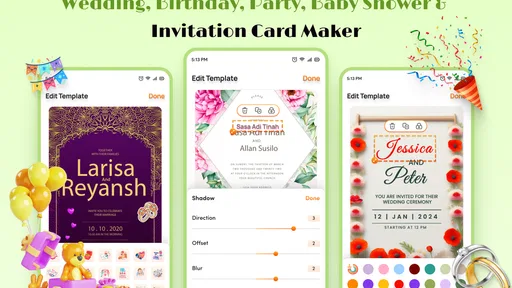
 Analysis by AppCompare
Before choosing a wedding invitation tool, I’d think about what the invitation needs to do: look personal, communicate the essential details clearly, and reach guests in a format they can actually use. That practical balance is where Wedding Invitation Maker makes sense. It is a free event-planning app from EverestSol, aimed at people who want to create a wedding card with text rather than begin with a professional design program or arrange printed stationery first.
A focused tool for a personal first draft
I see its strongest use as making an invitation that feels considered without turning the job into a major design project. You can start with a visual direction, then work on the wording and appearance together. That matters because a beautiful card can still fail if the date, venue, or names are hard to read. I’d treat the finished design as both a keepsake-style greeting and a piece of practical communication, checking the key details before sharing it.
A useful workflow is to write the invitation wording before settling on colors and decorative elements. Include the names, date, time, venue, and any response instructions you need, then choose a layout that gives those details enough room. This helps avoid the common trap of polishing the artwork first and squeezing the important information into whatever space remains. If you are composing a longer message, I’d keep it concise and preview how it sits in the design rather than assuming every line will remain legible.
Who will get the most from it
This is a natural fit for couples who want a personal look, are comfortable making their own choices, and expect to distribute at least some invitations digitally. It may also suit a friend or relative helping with wedding preparations: one person can focus on the wording while another gives feedback on the style, instead of passing around a physical proof at every small change. Since the app is free, it is an easy starting point for someone who wants to explore a design before deciding whether printed stationery is worth arranging.
It is less suitable if you need a complete planning system for guest lists, seating, budgets, vendor coordination, and reminders. An invitation maker has a narrower job, and I would not make it the central record for every wedding decision. Likewise, couples who need a highly controlled print workflow, exact paper specifications, or a designer’s art direction may be better served by a dedicated print provider or professional design software. The right choice depends less on how elaborate the wedding is than on how much control and coordination the invitation process demands.
Small checks that make the result better
Before sending anything, I would inspect the design on a phone screen and at a larger size if possible. A layout that looks balanced while editing can feel crowded when viewed as a message attachment, especially if the text is small or the background is busy. Ask someone who has not helped write the invitation to read it once; they are more likely to spot a missing time or an unclear venue instruction. This quick proofread is especially valuable when a card combines decorative lettering with details guests need to act on.
I’d also keep a clean copy of the final wording somewhere outside the design. If you need to correct a typo, change a detail, or prepare a second version for another group of guests, having the text ready makes the revision less error-prone. For example, a couple might want one invitation with travel information for out-of-town guests and a shorter version for local friends. Keeping those variants clearly labeled can prevent the wrong details from being sent to the wrong people.
Worth Reading Before You Choose

Switching to Android Auto Means Rethinking Your Driving Routine

Google Calendar Makes a Crowded Week Easier to Manage

Baby Panda World Brings Quick Play to Modern Phones, but Its Game Library Feels Busy

ESPN’s Live Game View Makes Following Close Games Easier

QuizzLand Review: A Good Fit for Short Trivia Breaks, Not Every Player

Basketball Stars: Multiplayer Is Fast, but Can It Recover When Matches Go Wrong?
Current state and what the version tells us
The app is listed as version 1.10, with a release date of August 25, 2025, and it runs on Android 6.0 or later. Those facts give prospective users a simple snapshot of its current position, but a version number on its own does not tell me which features changed or how the interface has evolved. I would avoid assuming that a particular tool was recently added just because the app has a numbered release history. What matters in practice is whether the current build supports the design and sharing workflow you need.
For existing users, the sensible approach is to review a saved invitation after updating or switching devices, especially before distributing it widely. Check that the wording, image placement, and final file still look as intended. That is not a reason to expect trouble; it is simply a good habit for any design that people may rely on for event details. If you are starting fresh, the current version is the one to assess rather than basing your decision on assumptions about older builds.
Where it sits among invitation options
Compared with ordering cards from a stationery shop, a maker app offers a more immediate route to a custom-looking design and avoids committing to a printed batch before you are ready. The trade-off is that you take responsibility for checking the result and arranging how guests receive it. Compared with general-purpose graphic design tools, this app’s wedding focus can make the task feel more direct, while a broader editor may offer finer control over layout and output. I would choose the simpler route when speed and approachable editing matter more than precise production settings.
Digital invitations are convenient, but they are not automatically right for every guest or every family tradition. If some relatives prefer paper, you can treat an app-made design as a starting point and arrange printing separately, after checking that the finished image or file suits the printer’s requirements. If you need guaranteed print quality or a specific paper finish, ask the print provider about acceptable formats before investing time in the design. That small check can save a finished card from being unsuitable for the physical result you had in mind.
Getting Started with Ease
When I first launched the Wedding Invitation Maker app, I was greeted with a super intuitive interface. You don’t need to be a tech wizard to figure this one out. The app walks you through each step, almost like it’s holding your hand. It’s got this friendly vibe that makes you feel right at home, even if it’s your first time creating digital invitations.
Customization Galore
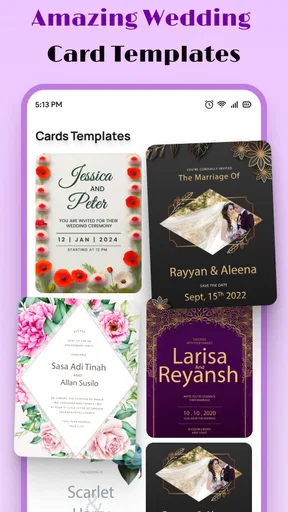
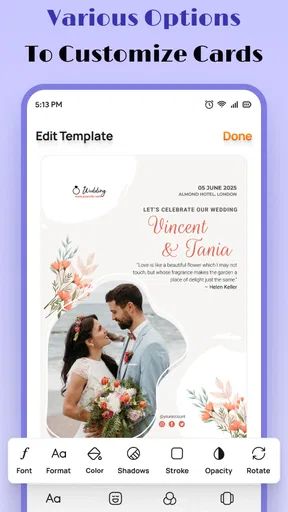
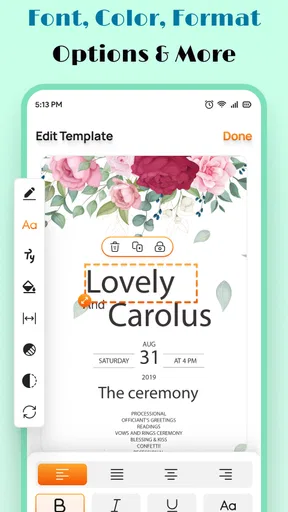
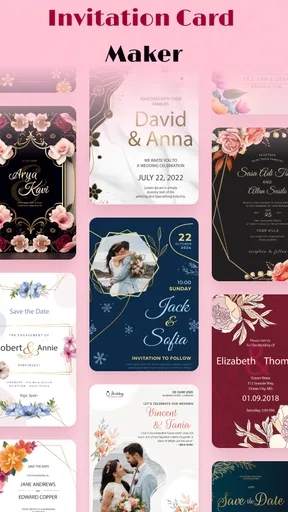
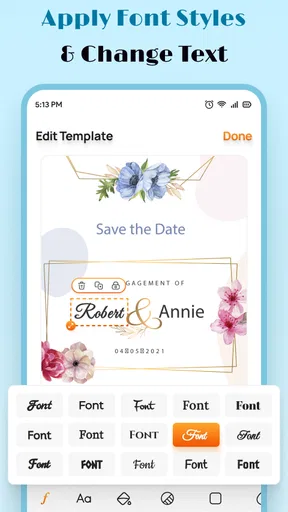
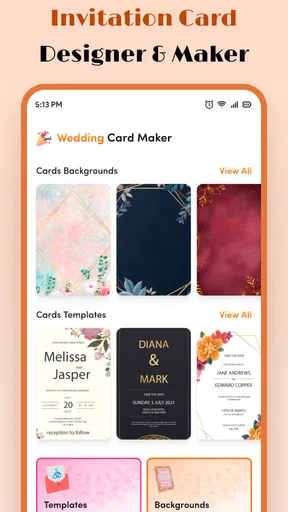
Now, let’s talk about the real magic here—customization. This app is like your personal design studio. You can choose from a plethora of templates, each more gorgeous than the last. Whether you’re going for something classic, modern, or a bit quirky, there’s something for everyone. I found myself getting lost in the options, tweaking colors, fonts, and layouts to match the vibe I was going for.
And the best part? It’s all in your hands. You can upload your own images or choose from a library of stunning graphics. Want to add a personal message or a poem? Easy peasy. It’s all about making the invitation uniquely yours, and this app nails it.
Sharing Made Simple
Once you’ve crafted your masterpiece, sharing it is a breeze. The app lets you send invites directly via email, WhatsApp, or even print them out if you’re a fan of the traditional touch. I loved how it integrated seamlessly with my contacts, making it ridiculously easy to keep everyone in the loop.
Plus, there’s a feature to track RSVPs, which is a lifesaver. No more spreadsheet nightmares or missing out on who’s coming and who’s not. Everything’s organized in one place, saving you both time and stress.
Why You'll Love It
So, why should you give this app a whirl? Well, for starters, it’s budget-friendly. Weddings can be crazy expensive, but this app helps cut costs without sacrificing style. It’s also incredibly convenient—no more running to the stationery store or waiting weeks for your invites to arrive.
The Wedding Invitation Maker app is also constantly updated with new templates and features, so you’re never stuck with outdated designs. The developers seem to genuinely care about user feedback, which makes the app feel more like a community-driven project.
Lastly, I have to mention the fun factor. Creating your wedding invitations should be enjoyable, not a chore. This app turns it into a creative adventure, and honestly, I found myself having a blast experimenting with different ideas.
All in all, if you’re in the market for a hassle-free, creative, and efficient way to craft your wedding invitations, this app is definitely worth checking out. Whether you’re going for elegance or a more laid-back vibe, it’s got all the tools you need to make your big day memorable from the very start.
So go ahead, give it a try, and let your imagination run wild. Happy planning!
A realistic way to use it
Picture a couple finalizing details after work, with relatives already asking when the invitations will arrive. One person can draft the message and confirm the venue details while the other experiments with a template and image choices. They can review the design together, make corrections before it goes out, and use a digital version to reach guests quickly. That is a practical setting for a focused invitation app: it helps turn scattered decisions into one shareable piece without requiring a full desktop design setup.
For a large guest list, I would still keep a separate, reliable record of who has been contacted and who has replied. The original review describes RSVP tracking, which can be convenient, but couples should decide whether that view is enough for their actual planning needs. If responses need to be reconciled across family members, paper replies, and multiple channels, a dedicated guest-list document may be easier to audit. The app can help with invitations without needing to replace every other organizational tool.
Practical limits and expectations
There is a difference between creating an attractive invitation and having a complete event-management system. This app is centered on wedding cards and their presentation; I would not rely on it alone for complex guest coordination or specialized print preparation. Also, design freedom comes with a small responsibility: the more decorative elements you add, the more carefully you need to check readability. A restrained layout with clear contrast can be more useful than a heavily embellished card, particularly when guests will open it on small screens.
The app is free, is rated for Everyone, and has more than 100,000 installs. That makes it approachable to try, but popularity and cost do not tell you whether its style or workflow will suit your particular celebration. I’d judge it by making a draft with real invitation text, not just browsing templates. If the editing feels comfortable and the result is easy to read, it may be all you need; if you hit limits around precision, printing, or collaboration, a broader design tool or stationery service is the more sensible option.
What to watch as you decide
EverestSol is the developer, and the current release provides a useful point of reference for anyone considering the app now. The release date and version establish when this current snapshot appeared, but they are not evidence of a specific improvement or promise about what comes next. I would watch for changes that affect everyday work—such as how easily a design can be revised, how reliably it can be shared, and whether the available layouts continue to fit different wedding styles—rather than treating a new version number as a guarantee of a particular feature.
One question many couples have is whether they can make something that still feels personal rather than like a standard template. The practical answer is to use the template as a starting structure, then make deliberate choices about wording, color, and imagery. Another is whether the result can serve guests who prefer printed cards: the design can be a starting point, but anyone planning a print run should confirm the output is suitable with the printer first. And if the key concern is keeping responses organized, test the RSVP workflow with a small group before making it the only place you track replies.
My take for couples planning now
Wedding Invitation Maker is most appealing when you want an accessible way to shape a wedding card and share it without making the invitation itself a major project. Its event focus, free access, and approachable creative workflow give it a clear role, while the need to proofread, manage broader guest logistics separately, and check print suitability keeps expectations grounded. I would recommend trying it to couples who enjoy making a few design decisions and want a quick route to a personalized invitation. If you need exact production control or a complete planning hub, choose a tool built for that job instead.
Pros
- User-friendly interface for easy navigation.
- Wide variety of templates to choose from.
- Customizable fonts and colors.
- Option to add personal photos and text.
- Instant sharing on social media platforms.
Cons
- Limited free features; premium required.
- Occasional ads can interrupt workflow.
- Some templates feel outdated.
- Requires internet for full functionality.
- Limited export format options.
FAQs for Wedding Invitation Maker App
What features does the Wedding Invitation Maker app offer?
The Wedding Invitation Maker app provides a wide array of customizable templates, fonts, and color schemes to create personalized wedding invites. Users can easily add photos, text, and even music to their invitations. It also offers options for digital sharing and printing, ensuring flexibility in how you send your invites.
Is the app user-friendly for those with no design experience?
Absolutely! The app is designed with a user-friendly interface, making it accessible to individuals with no prior design experience. It includes drag-and-drop functionality, easy-to-follow instructions, and pre-designed templates that simplify the invitation creation process, allowing anyone to craft beautiful invites effortlessly.
Can I share my invitations directly from the app?
Yes, the Wedding Invitation Maker app allows users to share their invitations directly via email, social media, or messaging apps. This feature ensures that you can reach your guests quickly and efficiently, whether you prefer digital invites or wish to print and mail them.
Does the app support multiple languages for invitations?
The app supports multiple languages, catering to a diverse range of users. You can easily change the language settings within the app, allowing you to create invitations in various languages, which is particularly useful for multicultural weddings or when inviting international guests.
Are there any additional costs or in-app purchases?
While the app offers a basic range of free features, there are premium templates and design elements available through in-app purchases. These optional purchases provide access to exclusive content, enhancing the overall design possibilities for your wedding invitations.


